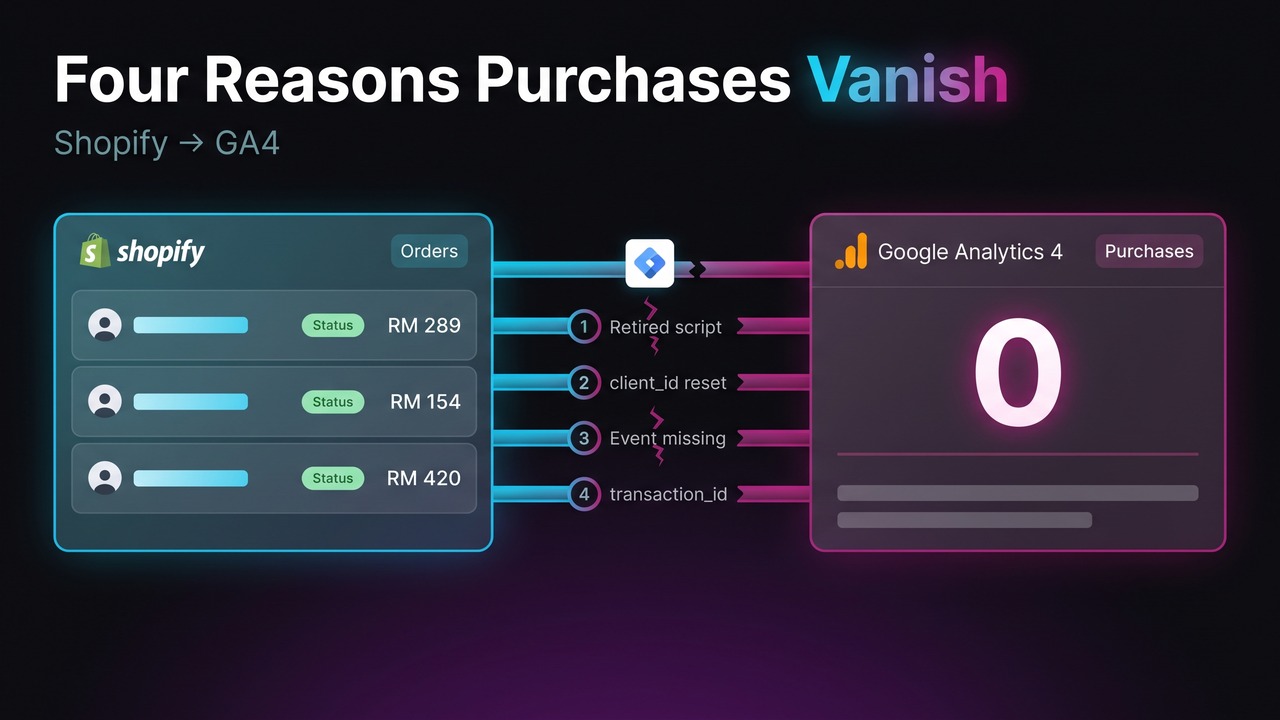
If purchases are not showing in GA4 on a 2026 Shopify store, not registering at all or registering wrong, it is almost always one of four faults: your tracking sits on a surface Shopify is retiring, the event fires but arrives with a new client_id so GA4 files it as a stranger, checkout_completed never fired, or a transaction_id fault is duplicating or collapsing orders. Shopify moved checkout tracking onto the Web Pixels API: analytics.subscribe inside a custom pixel is the only supported place for your own tracking JavaScript, on every plan from Basic upward, not just Plus.
| What you see in GA4 | Likely cause |
|---|---|
Purchases stopped on one date, view_item still arrives | 1. Retired tracking surface |
Fewer purchases than Shopify orders, worst on mobile; Direct and Unassigned jump at checkout; /checkouts/... as a landing page | 2. client_id reset in the sandbox |
| Some orders arrive, others never | 3. checkout_completed never fired |
| Revenue above Shopify's, or one purchase all period | 4. transaction_id fault |
Cause 1: purchases stopped on one date and never came back
Check Settings, Checkout, Configurations in Shopify admin: an upgrade notice on your Thank you and Order status pages means you are on the deprecated versions. Then see whether your gtag or GTM snippet sits in Additional scripts.
Shopify is retiring that surface in stages (shopify.dev, upgrade guide):
| Date | What stops working | Who |
|---|---|---|
| 13 Aug 2024 | checkout.liquid unsupported on Information, Shipping, Payment steps | Plus |
| 28 Aug 2025 | Additional scripts and checkout.liquid frozen, no PII; auto-replaced from Jan 2026 | Plus |
| 26 Aug 2026 | Pages auto-upgraded if you have not moved | Non-Plus |
On Plus, editing is already frozen. Non-Plus stores have until 26 August 2026, after which Shopify auto-upgrades the pages, and the new ones do not carry Additional scripts across. Fix: rebuild purchase tracking as a custom pixel under Settings, Customer events, then publish the new pages.
Cause 2: GA4 shows fewer purchases than Shopify, and more Direct traffic
The mechanism is the sandbox. Custom pixels run in a lax sandbox, documented as "an iframe element that has the sandbox attribute defined with the allow-scripts and allow-forms values" (shopify.dev). allow-same-origin is not on that list, so the pixel cannot reach the top frame and document.cookie is unavailable to it.
Inference, not documented Shopify behaviour: with no cookie access, gtag cannot persist _ga, so it mints a fresh client_id and GA4 reads the checkout as a new user with no source.
The documented fix, rarely used. Inside a custom pixel analytics, browser and init are in scope as globals (shopify.dev), and browser's methods "asynchronously execute in the top frame" (shopify.dev), reaching the real cookie:
analytics.subscribe('checkout_completed', async (event) => {
  try {
    const ga = await browser.cookie.get('_ga');   // GA1.1.1234567890.1712345678
    const clientId = ga ? ga.split('.').slice(-2).join('.') : undefined;
    gtag('config', 'G-XXXXXXX', { client_id: clientId });  // config-level, not an event param
    // then send your purchase event
  } catch (e) { console.error(e); }
});
Two traps: event.clientId is Shopify's visitor ID, not GA4's client_id, and the await is a round trip to the top frame, so the page can go before it resolves.
Cause 3: the checkout_completed event never fired
Shopify documents two reasons. Post-purchase upsells relocate the event: "for upsells and post purchases, the checkout_completed event is triggered on the first upsell offer page instead. The event isn't triggered again on the Thank you page" (shopify.dev). Any tag gated on a Thank-you-page URL loses every order where the shopper saw an upsell. And: "If the page where the event is supposed to be triggered fails to load, then the checkout_completed event isn't triggered at all." No retry. On mobile-first traffic over variable networks, most MY and SG sessions, that is a real loss.
Check consent too, under Settings, Customer privacy: where a market requires it, pixels run only after the visitor agrees.
Fix: strip URL conditions and subscribe to the event, not the page. A failed load cannot be fixed in the browser, the honest argument for server-side purchases from a Shopify webhook, deduplicated on transaction_id. That is technical implementation work.
Cause 4: GA4 shows duplicate purchases, or only one
Received wisdom says two GA4 tags means double revenue. The mechanism is subtler. Google says it "deduplicates purchase events with the same transaction ID", and separately that "the same transaction ID shouldn't be used across different users" (Google), which implies dedup is scoped per user, though it never says so outright. On Shopify that stops mattering: the sandbox is already breaking identity, so the same order arrives under two visitor IDs that GA4 cannot merge. Two tags will double your revenue.
Check this in your reports, not DebugView, which shows raw hits before processing: the same order twice there while revenue reconciles means dedup worked.
The one-purchase symptom is a different fault. order.id is null on every event except checkout_completed, so a fallback like order?.id ?? '' sends transaction_id="" on every order, and Google "will deduplicate all purchase events that have transaction_id=""" (Google).
Fix: one authoritative purchase path per property, taking transaction_id from event.data.checkout.order.id on checkout_completed only. If the Google & YouTube channel sends purchase, do not also send it from GTM.
How to verify Shopify purchase tracking in 30 minutes
- Set
debug_modein your GA4 config and open DebugView. Neither GTM Preview nor Tag Assistant can see inside a custom pixel: Shopify says it "doesn't detect any Google tags in a custom pixel, or other pixels being loaded by GTM" (Shopify Help). - Place a real order from an incognito mobile browser using a UTM-tagged link, then repeat through a post-purchase upsell if you run one and once on a throttled connection.
- Watch for
purchaseand checkvalueandcurrencyagainst the Shopify order.transaction_idis Shopify's numeric order ID, not the#1042order name, so if your Google channel sends one and your pixel the other, dedup never matches. - In devtools, filter Network to
collectand comparecid, which carries theclient_id, on a storefront hit against the purchase hit. A change means your pixel is minting a fresh ID at checkout. - Pull 28 days of GA4 purchases against Shopify orders, split by device. Do not reconcile yesterday: GA4 takes 24 to 48 hours to finalise.
GA4 will always sit below Shopify: consent, ad blockers, the failed-page case, POS and subscription orders. No published benchmark for that gap is credible, so set your own baseline and alert on movement. Then check the rate against our APAC conversion rate benchmark, remembering Shopify measures session-to-order while some GA4 setups report user-based conversion.
Frequently asked questions
Do I need Shopify Plus to track purchases in GA4?
No. Custom pixels, which is how GA4 purchase tracking runs on Shopify, are available from Basic upward, per Shopify's plan table. Plus buys the Information, Shipping and Payment steps, the CheckoutBranding API and checkout UI extensions. checkout.liquid was the Plus-only surface, and it is being retired.
Why does GA4 revenue not match Shopify when the purchase counts line up?
Currency and definition, not tracking. A GA4 property left on the USD default converts your MYR or SGD amounts, so revenue looks wrong while counts are fine. On Shopify Markets, currencyCode is the presentment currency, so one property mixes currencies at Google's daily rate and never ties to your payout. Also, from 24 April 2025, Google & YouTube app purchase values account for discounts.
Why do Shopify, GA4 and Klaviyo all report different revenue?
Each is right about its own question. Shopify counts every order and is your revenue truth. GA4 attributes across the channels and sessions it can see. Klaviyo credits an order to a flow if it lands inside its conversion window after an open or click, so an email click then a Meta ad gets credited by both. Summing channel revenue across tools always overstates.
Start with the reconciliation, not a rebuild
Pull that 28-day comparison before anyone writes code. A small, stable gap means nothing to fix. Anything else, and that table tells a developer where to look. Bring it and talk to us, or see how we approach data and analytics.